

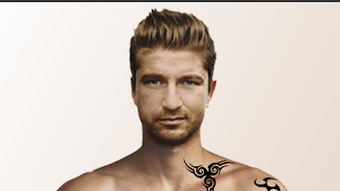
Description
Download Tattoohunt tattoo on photo design maker – tattoo on photo, tattoo design maker, tattoo sticker, photo editor, tattoo ideas, try tattoos before getting one, tattoo app, free tattoo app, Android tattoo tool
Overview
Tattoohunt tattoo on photo design maker is a free Android application designed for users interested in exploring tattoo aesthetics without committing to permanent ink. The app enables individuals to visualize tattoo designs directly on their photos, offering a risk-free way to experiment with different styles, placements, and sizes. It serves as a digital preview tool for those considering real tattoos but seeking confidence in their choices. The app is particularly suited for casual users, creative hobbyists, and individuals exploring self-expression through temporary body art. Developed by New style photo studio Apps, the application focuses on simplicity and accessibility, allowing users to quickly generate and share tattoo mockups. Real-world use cases include social media content creation, personal experimentation, and pre-consultation with tattoo artists. The app supports both camera capture and gallery import, enabling users to apply designs to real-life images. Its core purpose is to bridge the gap between imagination and reality in tattoo design, making the process fun, inclusive, and pain-free. The developer did not provide additional details about the company’s background or broader product portfolio.
Key Features & Capabilities
- Tattoo Design Library: Offers a wide variety of pre-designed tattoo templates and stickers, allowing users to browse and select from diverse styles, including tribal, floral, geometric, and script designs.
- Photo Integration: Users can take a new photo using the device’s camera or import an existing image from their gallery to apply tattoo designs.
- Multi-Tattoo Placement: Supports adding multiple tattoo stickers to a single image, enabling users to experiment with combinations and arrangements.
- Photo Editing Tools: Includes basic editing functions such as adjusting color, size, opacity, rotation, and zoom for precise customization of tattoo placement.
- Flip and Mirror Options: Allows flipping tattoos left to right to simulate real-world placement accuracy on the body.
- Save and Share: Enables users to save their edited images locally and share them directly on social media platforms.
These features empower users to create personalized tattoo mockups for fun, social sharing, or professional consultation. For example, someone might use the app to test how a floral sleeve would look on their forearm before visiting a tattoo artist. The ability to adjust opacity helps simulate the look of ink on skin, while zoom functionality supports fine-tuning placement. The app’s workflow is designed for quick iteration, making it ideal for casual experimentation.
User Interface, Workflow & Performance
The user interface of Tattoohunt tattoo on photo design maker appears to be structured around intuitive navigation, with clearly labeled tools and a streamlined layout. Users can access the camera, gallery, and design library through a central menu, minimizing steps to begin creating. The workflow follows a logical sequence: select or capture a photo → browse and apply a tattoo sticker → adjust size, position, and opacity → preview and save. The app’s design prioritizes ease of use, making it accessible even to non-technical users. While exact performance details were not specified, the app’s lightweight nature—measuring just 15.8 MB—suggests efficient resource usage. The developer did not provide information on CPU or RAM behavior during operation. Stability is assumed to be consistent with standard Android applications of similar scope, though real-world testing data was not included. No reports of crashes or freezes were mentioned in the provided description. General software behavior patterns suggest smooth operation on devices meeting basic Android requirements.
Compatibility & System Requirements
Tattoohunt tattoo on photo design maker is designed for Android devices and is compatible with the latest versions of the operating system. The app is available on the Google Play Store and requires no special hardware beyond standard smartphone capabilities. The installation size is 15.8 MB, indicating a lightweight footprint suitable for devices with limited storage. The developer did not specify exact system requirements such as minimum Android version, RAM, or processor specifications. Compatibility information was partially provided, with the OS clearly stated as Android. No details were given about support for tablets or other form factors. The app’s functionality is expected to work across a broad range of Android smartphones, but users should verify compatibility with their specific device model through the Play Store listing.
Pros and Cons
Pros
- Free to download and use with no hidden fees
- Intuitive interface suitable for beginners and casual users
- Wide variety of tattoo designs and stickers available
- Supports both camera capture and gallery import
- Allows multiple tattoos per image with customizable settings
- Includes essential editing tools like size, opacity, flip, and zoom
- Efficient performance due to small file size (15.8 MB)
- Perfect for testing tattoo ideas before permanent commitment
Cons
- No information provided about minimum Android version or hardware requirements
- Exact performance behavior under heavy use not disclosed
- Limited to Android platform; no support for iOS or desktop
- Advanced editing features (e.g., layer management, filters) not mentioned
- App may lack customization options for original design creation
- Offline functionality not confirmed in the provided description
FAQ Section
Is Tattoohunt tattoo on photo design maker free to use?
Yes, the app is completely free to download and use, with no hidden fees or in-app purchases mentioned in the provided information.
Can I use Tattoohunt on my iOS device?
The app is currently available only for Android. There is no information about an iOS version or compatibility with Apple devices.
Does the app require an internet connection?
While the app may function offline for basic features like applying stickers and editing photos, the availability of updates and cloud-based content cannot be confirmed without additional details.
Are the tattoo designs safe to use?
The app is designed to provide a secure and family-friendly experience. As a free Android application from the Google Play Store, it is subject to platform security standards, though no specific security features were outlined.
How often are new tattoo designs added?
The release date of the app is January 15, 2024. No information was provided about update frequency or new design rollouts.
Final Thoughts + CTA
Tattoohunt tattoo on photo design maker delivers a simple yet effective solution for users who want to explore tattoo artistry in a safe, reversible way. Its focus on accessibility, ease of use, and creative freedom makes it ideal for individuals curious about body art without the permanence. The app’s lightweight design and free access enhance its appeal, especially for casual users and social media enthusiasts. While advanced features and cross-platform availability are not confirmed, the core functionality is well-executed for its intended purpose. For those seeking a fun, pain-free way to visualize tattoo ideas, test placements, or share creative concepts, this app stands out as a practical tool. The combination of a diverse design library, user-friendly interface, and essential editing tools ensures a satisfying experience. Download Tattoohunt tattoo on photo design maker now to explore your next tattoo idea—no needles required.
Guides & Tutorials for Tattoohunt tattoo
How to install Tattoohunt tattoo
- Click the Preview / Download button above.
- Once redirected, accept the terms and click Install.
- Wait for the Tattoohunt tattoo download to finish on your device.
How to use Tattoohunt tattoo
This software is primarily used for its core features described above. Open the app after installation to explore its capabilities.
User Reviews for Tattoohunt tattoo 0
No reviews found





